Log work days, track weekly goals, and understand your real profit.
A personal financial log for couriers who want to track work days, costs, goals, and real profit separately from delivery platforms.
Delivery Tracker is an independent financial log.
21-day free trial, with no commitment.
1. Record your hours, orders, distance and income. Choose a period with the monthly filter and expand a row to review its expenses.
2. Review monthly income, profit and averages. Daily, weekly and monthly summaries, charts and the yearly breakdown help you compare periods.
3. Set a weekly income target and track your progress. Page through past weeks on desktop; on mobile, Previous weeks opens the history.
4. Review income and expenses for completed months. Expand the details for averages or download the monthly data as CSV.
Screenshots use demo data.
Screenshot guideHow to use Delivery Tracker
Four steps from daily work to your monthly overview. Choose a step, then select the screenshot to see it in detail.
1. Record your hours, orders, distance and income. Choose a period with the monthly filter and expand a row to review its expenses.
2. Review monthly income, profit and averages. Daily, weekly and monthly summaries, charts and the yearly breakdown help you compare periods.
3. Set a weekly income target and track your progress. Page through past weeks on desktop; on mobile, Previous weeks opens the history.
4. Review income and expenses for completed months. Expand the details for averages or download the monthly data as CSV.
Screenshots use demo data.
Clear on the go
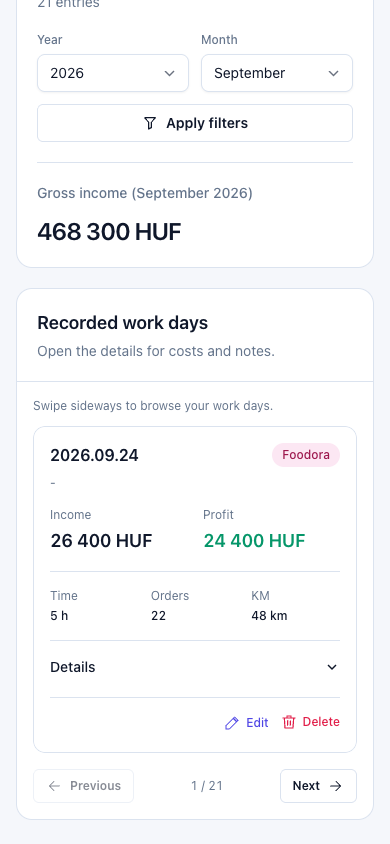
On mobile, swipe sideways through your work day cards. Expand the details to see expenses and notes.

Available as an installable app
Use Delivery Tracker in its own app window on Mac, Windows, and Android, directly from the browser.
No required App Store or Play Store installation.

The details, all in one place
Vehicles and fuel
Vehicle profiles, fuel price history and automatic cost calculations.
Expenses and tax
Fuel, parking, maintenance and monthly tax: see how much you keep.
Notes and export
Keep the details of your work days and download monthly data as CSV.
Need help or want to share feedback?
Send us a message and we will review it directly in our admin inbox. Whether it is a product question, a bug report, or partnership interest, we are happy to hear from you.
Questions about tracking, subscriptions, reporting, or future features are all welcome. We keep the process simple so you can reach out without leaving the site.
Your message is stored securely inside Delivery Tracker for review by the admin. No email is sent automatically from the app.